WebDYI
WebDYI
No-code widgets
Made for Canva creators

Add interactive widgets to Canva.
Without writing a single line of code.

Canva is amazing for layouts, but it can't do forms, calculators, before/after sliders, animated CTAs, or anything truly interactive. WebDYI fills that gap — no developer required.

Ask ChatGPT (or any AI) for the widget you want. Paste the code into WebDYI. Drop the live link into Canva's Embed element. Done.

Free forever — unlimited widgets, no credit card.

LIVE IN CANVA

Drag the slider — this is a real WebDYI widget, embeddable in Canva exactly like this.

The Canva brick wall

You've felt it. We've all felt it.

The moment a client asks for something Canva doesn't natively support, your only options are: tell them no, hire a developer, or hack together a screenshot. WebDYI gives you a fourth option.

Things Canva can't do
  • Working contact / lead-gen forms
  • Mortgage / pricing / quote calculators
  • Before / after image sliders
  • Hover reveals, animated CTAs, countdown timers
  • FAQ accordions, testimonial carousels, signup gates
Things WebDYI lets you drop in
  • Any of the above — already built as starter widgets
  • Anything you can ask an AI to write for you
  • Customizable through a simple no-code form
  • Served from a fast CDN, sandboxed for safety
  • One link that works in Canva, Notion, Shopify, anywhere
How WebDYI fills the gap

Every Canva limitation, removed.

Each WebDYI widget is a live, sandboxed web page that Canva treats as an Embed. That single trick lets you do everything Canva designed out.

Canva can't

Collect form submissions

Canva's text fields are decorative. Nothing gets sent anywhere when a visitor "submits."

WebDYI solves it

Embed a real form widget that posts to your webhook, Google Sheet, or email tool. Validation, success states, and spam protection included.

See the contact form widget →
Canva can't

Run live calculations

No formulas, no JavaScript. A mortgage page in Canva is just an image of one.

WebDYI solves it

Drop in a calculator widget (mortgage, ROI, pricing, quote). Numbers update instantly as visitors type — right inside your Canva layout.

Generate one with AI →
Canva can't

Show before / after

Two side-by-side images aren't the same. Visitors can't drag, swipe, or compare.

WebDYI solves it

A draggable slider widget reveals the transformation. Perfect for renovation, photography, fitness, and skincare clients.

See the slider widget →
Canva can't

Create real urgency

A "Sale ends Friday" text block doesn't tick. No countdown, no timezone awareness.

WebDYI solves it

A countdown widget counts down live, in every visitor's local time. Set the end date once — it just works.

See the countdown widget →
Canva can't

Hide long content cleanly

An FAQ in Canva is a wall of text that pushes everything else down the page.

WebDYI solves it

Accordion and tab widgets let visitors expand only what they care about. Your Canva layout stays tight.

See the FAQ widget →
Canva can't

Update content without re-editing

Change a price or a date and you're back in Canva re-publishing the whole site.

WebDYI solves it

Edit any text, color, or image through WebDYI's no-code panel. The Canva embed reflects it instantly — no re-publishing required.

Read the docs →
The AI → Canva flow

From ChatGPT to your Canva page in 4 steps.

You don't need to know what HTML is. You need to know how to copy and paste.

1 Ask the AI

Describe the widget you want

Type your idea below. We'll wrap it in a battle-tested prompt that asks the AI for both the widget code and a WebDYI schema (so your client can edit it later without code).

Paste the copied prompt into ChatGPT, Claude, Gemini — any AI you already use. It gives you back a block of code. You don't have to read it; you just copy it into WebDYI in step 2.

2 Paste into WebDYI

Drop the code into the editor

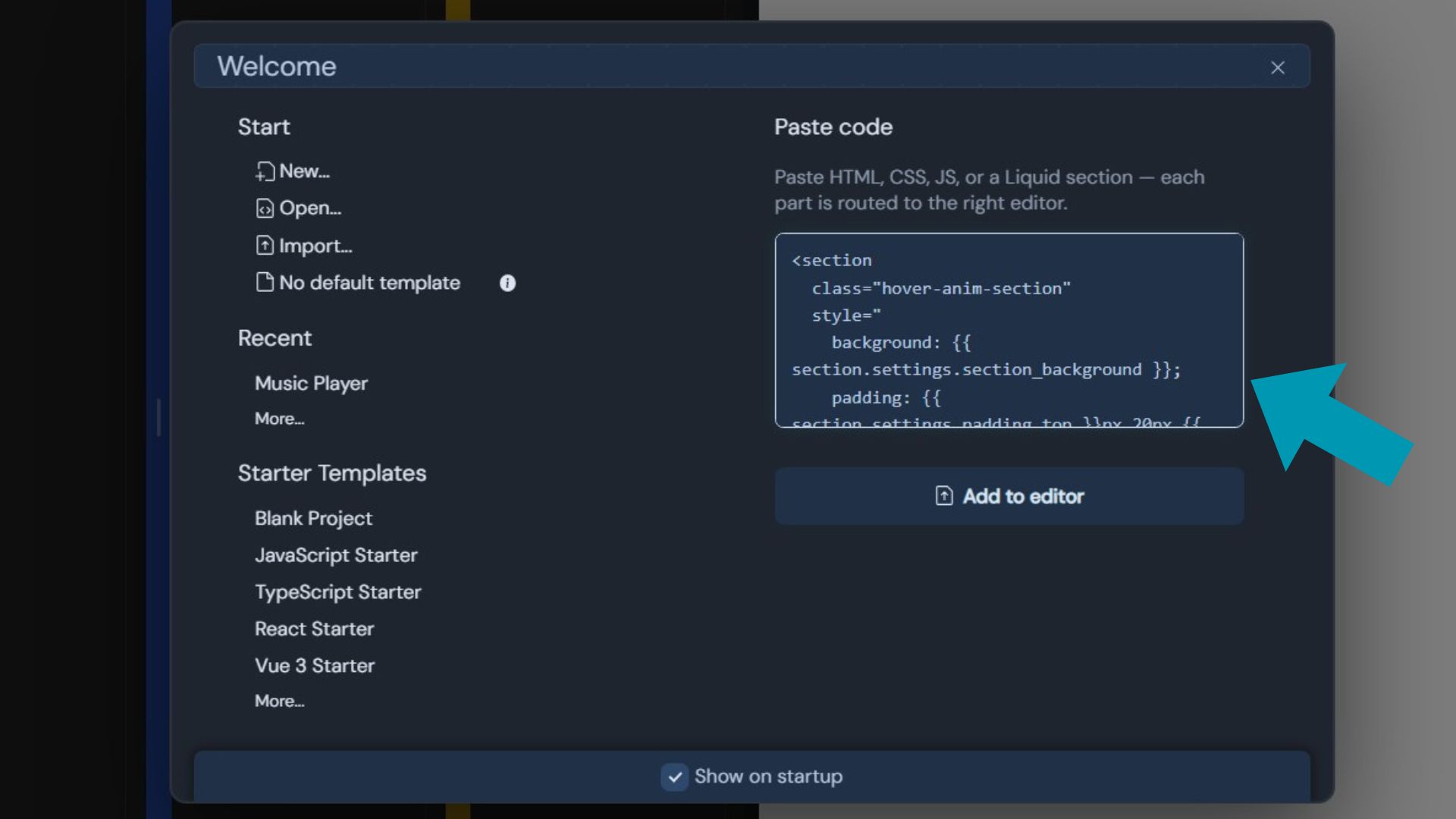
Open WebDYI App, create a new widget, and paste the code from the AI straight into the editor. No setup, no install, no terminal.

Pasting AI-generated code into the WebDYI editor

WebDYI parses the code and gets it ready to show.

3 Preview

See it work instantly

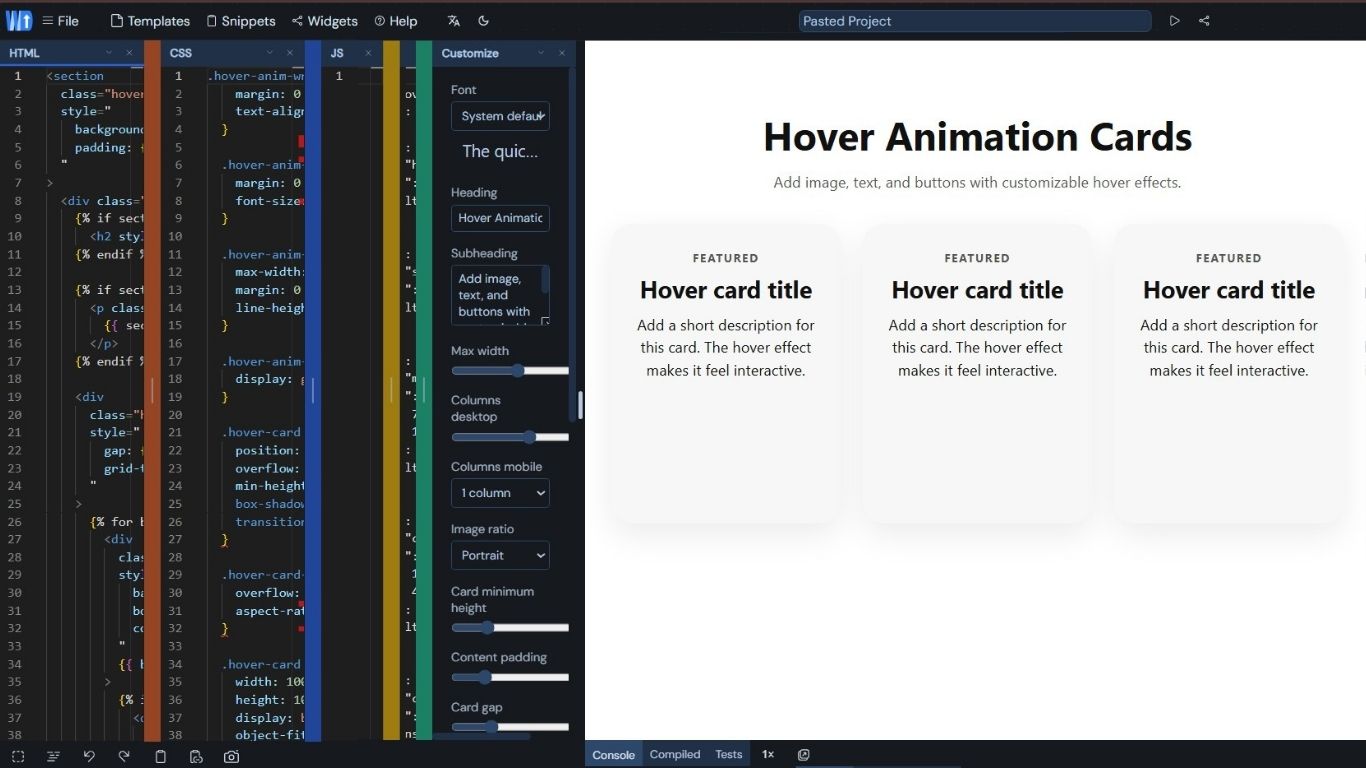
The code is assigned to your widget. You see a live preview right next to the editor — exactly what your visitors will see in Canva.

Code assigned to the widget with live preview

Don't like something? Ask the AI to fix it and paste again. Or tweak the text through WebDYI's no-code panel.

4 Share to Canva

Drop the link into Canva's Embed

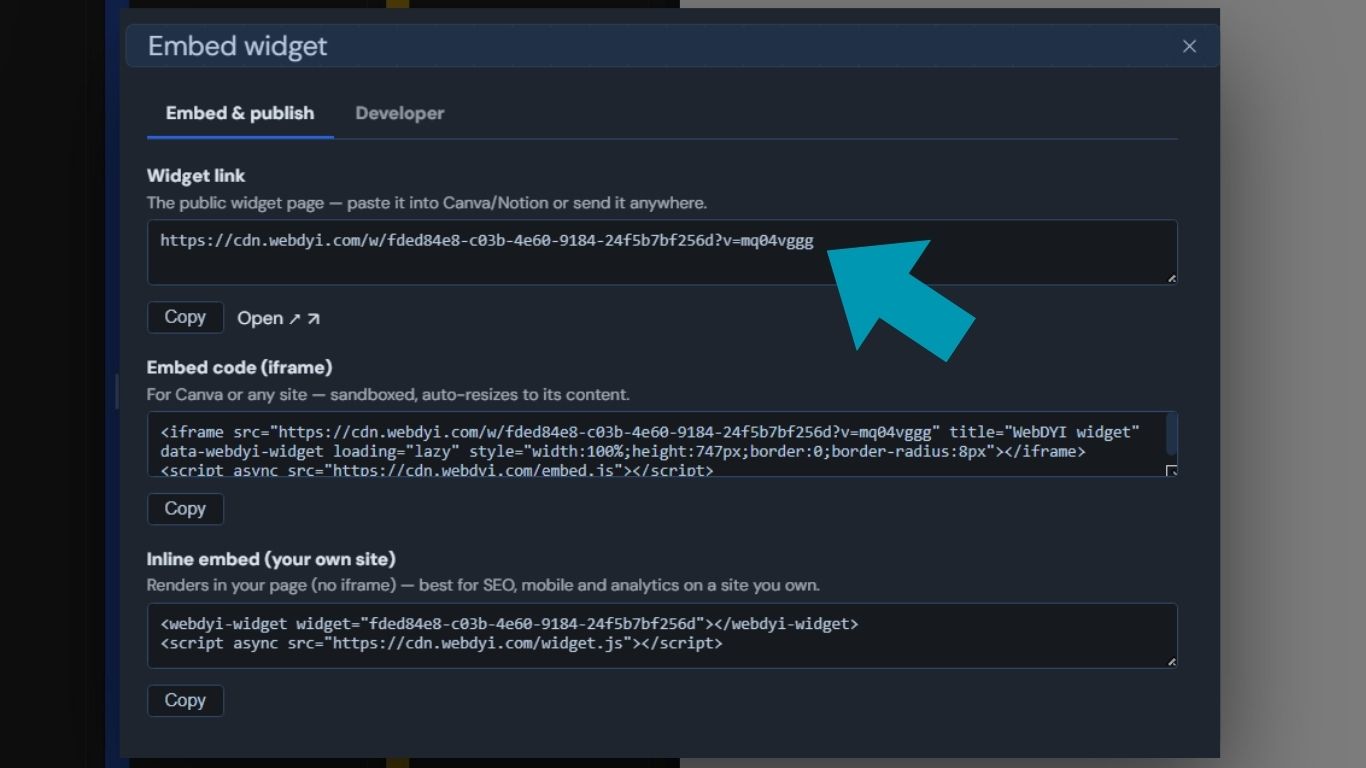
Click Embed in WebDYI. Copy the link. In Canva, add an Embed element from the Apps panel and paste the link. Your widget appears live inside your Canva design — and stays live for every visitor.

  1. 1. In Canva: Apps → Embed
  2. 2. Paste your cdn.webdyi.com/w/... link
  3. 3. Resize and position like any Canva element
Copying the embed link from WebDYI
Built for designers, not developers

Things you can add to your Canva page today.

Start from a ready-made starter, or paste your own AI-generated code. Either way, no coding skills required.

Calculators & quote tools

Mortgage, ROI, pricing — anything that takes a few numbers and returns an answer.

Lead-capture forms

Multi-field signup forms with validation. Wire them up to your favorite email tool through a webhook.

Before / after sliders

Perfect for renovation, photography, and skincare brands. Drag the handle, reveal the transformation.

Countdown timers

Real urgency for launches, sales, and event registrations — counting down in every visitor's timezone.

FAQ accordions

Tap-to-expand answers that don't blow out your page layout.

Animated CTAs & hover effects

Make your call-to-action feel alive instead of static.

FAQ

Questions Canva designers ask us most.

Do I really not need to know how to code?

Correct. You ask an AI (ChatGPT, Claude, etc.) for the widget you want, copy the code it gives you, and paste it into WebDYI. You never have to understand or edit the code yourself.

Does this actually work inside Canva?

Yes. WebDYI is approved as an iframely provider, which is what powers Canva's Embed element. Paste your WebDYI link into Canva's Embed and the widget renders live inside your Canva page or website.

What if the AI gives me broken code?

WebDYI shows you a live preview as soon as you paste. If something looks off, just ask the AI to fix it ("the button color is wrong, make it blue") and paste the new version. No deploys, no waiting.

Will my client be able to change the text and colors themselves?

Yes — as long as the widget exposes a schema. The schema is a small JSON block that tells WebDYI which pieces of text, colors, or images should be editable. Once it's in place, WebDYI auto-generates a no-code form your client can use to update the widget without ever touching code or Canva.

Good news: you don't have to write the schema by hand. Use the copy-paste AI prompt below and the AI will produce the widget and a matching schema in one go.

How much does it cost?

Free forever for unlimited widgets and unlimited views. A $4.99/month plan removes the small WebDYI badge from your embeds if you want a fully white-label look. See pricing.

Is it safe to embed code from an AI on my client's Canva site?

Every WebDYI widget runs in a sandboxed iframe with an opaque origin. That means the widget code can't touch the rest of the Canva page, can't read cookies, and can't break your layout. It's the same isolation model Stripe and YouTube use for their embeds.

Ready to make Canva do more?

Stop telling clients "Canva can't do that." Start telling them "give me ten minutes."